Writing online has become part of everyday life. Whether you create blog posts, send business emails, write product descriptions, or share updates on social media, correct spelling matters. Even a small typo can make your content harder to understand and may give readers a less professional impression.
This is where online spelling tools such as SpellMistake.com can be useful. In 2026, many writers are looking for simple and affordable ways to check their content without investing in costly writing software.
In this complete guide, we will take a closer look at SpellMistake.com, its main features, how the platform works, and what users should know before using it. We will also discuss how professional content services such as PrimeFutureAI can provide additional value beyond basic spelling correction.
With more businesses and individuals publishing content online, the need for clean and readable writing continues to grow. From website articles and marketing copy to emails and social media posts, well-written content helps create a stronger impression. A few unnoticed spelling errors may reduce credibility, especially when the content represents a business or brand.
For this reason, easy-to-use spelling checkers are becoming a useful part of the writing process. Tools like SpellMistake can help users identify common errors quickly, while professional content teams can help with broader areas such as content quality, structure, SEO, and overall communication.
What Is SpellMistake.com?
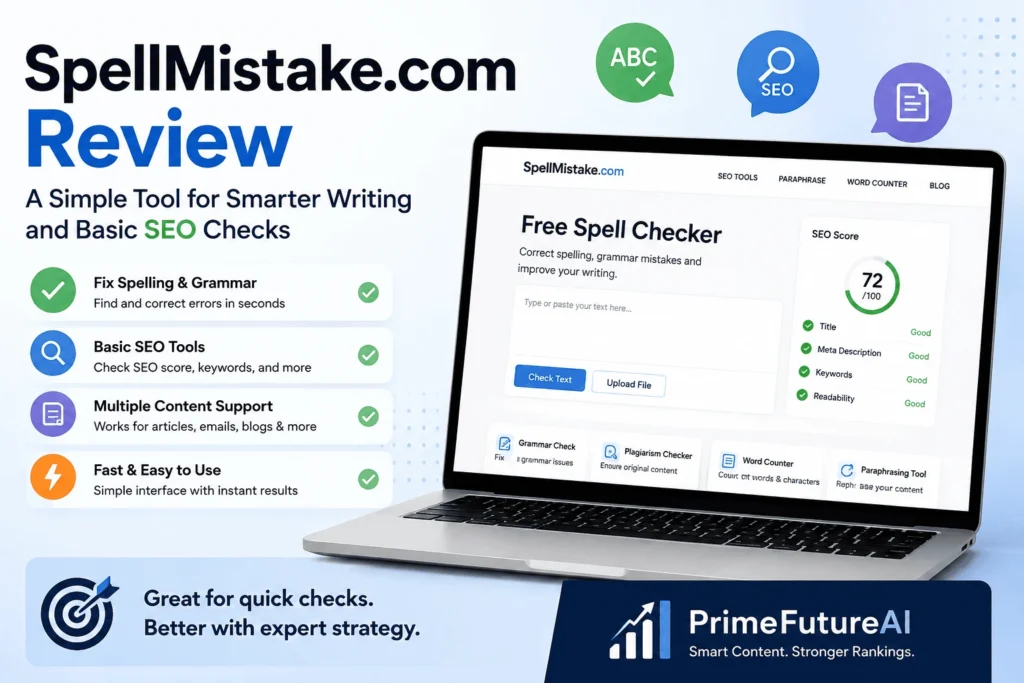
SpellMistake.com is a free web-based tool designed to help people improve written content. Its main purpose is to detect spelling errors and help users correct them. The platform also includes grammar checking and some basic features that can support SEO-focused writing.
Using the tool is straightforward. You simply enter or paste your content into the provided text area and start the check. The system scans the writing and points out possible mistakes along with correction suggestions.
SpellMistake.com can be useful for different types of content, including:
- Emails and professional messages
- Blog articles
- Student assignments
- Social media posts
- Business and workplace documents
One useful feature is that users can access the tool without creating an account. This makes it convenient when you only need a quick review and do not want to go through a registration process.
However, basic error checking may not be enough for writers who need high-quality, polished content. Professional content often requires more than correcting spelling and grammar, such as better organization, clear messaging, strong readability, and SEO optimization.
Spell-checking tools are not new, but modern platforms are making the process more convenient by combining several writing features in one location. Instead of using separate services for spelling, grammar, and basic SEO checks, users can handle these tasks through a single platform. This all-in-one approach is one reason tools like SpellMistake.com continue to attract attention from online writers.
How Does SpellMistake.com Work?
SpellMistake.com is designed to make text checking quick and easy. You do not need advanced writing skills or complicated settings to use it. The basic process can be completed in just a few simple steps.
Simple Steps to Use SpellMistake.com
Most users can check their content by following this process:
- Visit the SpellMistake.com website.
- Enter your text or paste it into the available field.
- Start the checking process.
- Look through the errors marked by the tool.
- Review the recommended changes and correct the mistakes you want to fix.
For short pieces of content, the check can normally be completed very quickly. This makes the platform useful for students, casual writers, and people who need to review text before sending or publishing it.
However, finding mistakes quickly does not mean that every writing problem will be detected. Automated checkers are generally good at identifying common spelling and grammar errors, but they may not fully understand the purpose or context of your writing.
For example, a tool may not recognize whether a sentence sounds natural for a specific audience or whether the overall content has a clear flow. It may also have limitations when dealing with industry terminology, creative writing, unusual expressions, or sentences that are grammatically correct but difficult to understand.
Most automated writing checkers rely on language patterns, spelling databases, and predefined grammar rules to identify possible problems. This approach works well for basic corrections, but human review can still be valuable when content requires accuracy, strong readability, brand consistency, or a specific writing style.
Types of Content You Can Check
SpellMistake.com can be used for different kinds of written material, making it a practical option for everyday writing tasks. Users can review content such as:
- Website pages
- Blog posts and articles
- Promotional and marketing emails
- Social media updates
- Student and academic assignments
This wide range of use makes the tool helpful for people who only need a quick content check. However, companies that publish content regularly may need more than spelling and grammar corrections. They often need a complete system to maintain quality, accuracy, tone, and consistency.
For businesses, consistency becomes especially important when producing content at scale. Fixing a typo in one email is simple, but managing dozens of articles, website pages, and marketing materials each month requires a structured review process.
A professional content team can help maintain the same quality and writing standards across every piece of content. This creates a more reliable publishing process and helps ensure that business content remains clear, polished, and consistent.
Main Features of SpellMistake.com
SpellMistake.com includes several features that can help users find common writing problems and make their text cleaner. Here are some of the key functions to consider.
Instant Spelling Checks
SpellMistake.com can identify spelling problems while you are reviewing your text. Possible errors are marked so you can notice and correct them quickly instead of checking every word manually.
This can be useful when working on short messages, emails, captions, or other quick pieces of content. However, correcting spelling alone is not enough to make a long article high quality.
Detailed blog posts also need a clear structure, smooth transitions, useful headings, and information that directly meets the reader’s needs. A spelling tool can identify certain language errors, but it cannot fully evaluate whether an article is well organized or provides valuable answers.
Grammar and Word-Usage Checks
The platform also goes beyond basic spelling by identifying some common grammar and word-choice problems. Depending on the sentence, it may help users notice issues such as:
- Incorrect verb forms
- Problems with subject and verb matching
- Words that sound similar but have different meanings
- Common usage mistakes
These checks can make everyday writing easier to understand and more polished.
Confusing similar words is a common problem, especially when people write quickly. Examples include “your” and “you’re” or “affect” and “effect.” Finding these small errors before publishing or sending content can improve its overall appearance and make the writing seem more professional.
Built-In SEO Features
SpellMistake.com is not limited to spelling and grammar checks. The platform also includes a range of SEO-related tools that can help users with basic website and content analysis. It is reported to provide more than 50 tools covering different SEO tasks.
Some of the available tools may include:
- Keyword research
- Backlink analysis
- Domain authority checking
- Website error and issue checking
Having writing and SEO features together can be useful because good online content needs both clear language and search visibility. Users can review their text and perform basic SEO checks without moving between several separate platforms.
This setup can be particularly helpful for beginners who are still learning SEO. Instead of trying to understand multiple websites and tools at the same time, they can access different functions from one platform. This can make the early stages of content and SEO work simpler and more convenient.
Plagiarism Checker and Content Rewriting Tool
SpellMistake.com also provides features that can help users review and refresh their written content. Its plagiarism checker is designed to help writers identify possible duplicate material, while the rewriting feature can provide alternative wording for existing sentences.
These functions can be useful for students, new writers, and people who want to improve a draft quickly. However, automatically rewritten text should still be reviewed by a person. Software can change sentence structures and replace words, but it may not understand the writer’s intended message, tone, audience, or brand style.
Checking originality is an important step before publishing online content. Unique writing helps websites maintain quality and avoid unnecessary duplication. Even when similar wording happens by accident, reviewing content before publication can reduce the risk of publishing material that is too close to existing sources.
A plagiarism checker can therefore work as a useful final review step, helping writers identify potential similarities before their content goes live.
Using SpellMistake.com for SEO and Content Improvement
SEO is not only about making sure a page has correct spelling. Good search optimization also depends on factors such as keyword use, page organization, readable content, search intent, and website performance.
SpellMistake.com combines basic SEO functions with its writing tools, which can be helpful for users who are new to search optimization. Depending on the available tools, users may be able to review areas such as:
- Keyword placement and usage
- Code-to-text balance
- Whether pages are indexed
- Basic website health
- Other common SEO elements
These features can give beginners a starting point for understanding how their website is performing. However, using an SEO checker alone does not create a complete optimization strategy.
Effective SEO requires research and planning. You need to understand what people are searching for, examine competing websites, choose the right topics, and create content that matches the needs of your target audience. Technical checks can identify problems, but they cannot determine the best strategy for a specific business.
Search engines consider many different factors when evaluating content. Relevance, useful information, page structure, keyword context, content quality, and user experience can all influence how a page performs. An automated tool may identify missing or weak areas, but it cannot replace strategic decision-making.
For businesses that want more than basic SEO checks, professional support can provide a broader approach. At PrimeFutureAI, the focus goes beyond finding errors. We analyze the target industry, research competitors, understand the audience, and develop content strategies designed to support stronger search visibility and long-term growth.
Benefits of Using SpellMistake.com
SpellMistake.com can be a useful option for people who want a quick way to review their everyday writing. While it has some limitations, its simple features make it convenient for basic content checks.
Free Access Without Registration
One of the convenient aspects of SpellMistake.com is that users can start checking text without going through a lengthy account setup. This is helpful when you only need to review a short message or document and want to get the task done quickly.
For example, someone can check an email or short paragraph before sending it without spending time creating a user profile.
Easy for Beginners
The platform is designed to be straightforward, so users do not need advanced technical or writing skills to get started. Its simple interface can be useful for:
- Students working on assignments
- Beginner bloggers
- People who are still improving their English
- Social media users
- Anyone who needs a quick text check
Helps Reduce Editing Time
SpellMistake.com can quickly scan written content and point out possible mistakes. This can be more efficient than checking every sentence manually, particularly when dealing with short emails, captions, or other everyday text.
However, saving time on basic corrections does not necessarily mean the content is ready for professional use. Business articles and marketing materials often require deeper editing to ensure the message is clear, the tone fits the brand, and the information flows naturally.
Automated checking can identify certain errors, but it may not understand whether a paragraph connects well with the next one or whether the writing speaks effectively to a particular audience. Human review remains important when content quality and brand communication matter.
SpellMistake.com vs. Grammarly vs. Microsoft Word
Different writing tools are designed for different purposes. Comparing their features can help you select an option that matches the type of work you do.
Grammarly
Grammarly is popular for its wider range of writing suggestions. It can help with grammar, tone, sentence style, and other writing improvements. However, some of its advanced functions are available through paid plans, and users may need to create an account to access the platform fully.
Microsoft Word
Microsoft Word has a built-in spelling and grammar checker, making it useful for everyday documents. It can handle many common writing mistakes, but it is not designed as a dedicated SEO platform and may not identify more detailed writing issues.
SpellMistake.com
SpellMistake.com focuses on providing a simple way to check writing while also offering additional SEO-related functions. Compared with Microsoft Word, it provides more tools for basic SEO tasks, while its straightforward setup can make it easier for users who want quick checks.
Quick Comparison
| Feature | Grammarly | Microsoft Word | SpellMistake.com |
|---|---|---|---|
| Account needed | Usually required | Not necessarily | No |
| SEO-related tools | Limited | No dedicated SEO tools | Yes |
| Main purpose | Advanced writing support | Documents and basic corrections | Writing and basic SEO checks |
| Suitable for | Writers who want detailed suggestions | Everyday document editing | Quick, combined checks |
Each platform has its own strengths. The best choice depends on what you expect from a writing tool and how detailed your editing needs are.
For occasional emails, captions, or short content, SpellMistake.com can provide a convenient checking option. Writers looking for more advanced language and style feedback may prefer Grammarly, while Microsoft Word remains practical for creating and editing standard documents.
For businesses, however, automated writing tools should be viewed as supporting resources rather than a complete content solution. A strong content strategy still requires audience research, planning, editing, SEO knowledge, and a clear understanding of business goals.
Who Can Benefit from SpellMistake.com?
SpellMistake.com may be useful for people who want a simple way to review their writing. However, its value can vary depending on the user’s goals and the type of content they create.
Students and Everyday Writers
Students can use the platform to review essays, assignments, and other written work before submitting them. Finding common spelling or grammar mistakes can help make their work cleaner and easier to read.
It can also be useful for people who write occasionally. If you need to check a short email, message, paragraph, or social media caption, a simple online checker can save time.
Bloggers and Digital Marketers
Bloggers who are learning the basics of SEO may also find the platform useful. Its SEO-related functions can provide a starting point for checking keywords and getting a general idea of website performance.
However, businesses and marketers aiming for strong organic growth usually need a more complete approach. Competitive search terms require detailed keyword research, competitor analysis, content planning, technical SEO, and regular performance tracking.
Building search visibility is an ongoing process rather than something achieved with one optimized article. Websites need consistent publishing, content updates, performance reviews, and strategy adjustments as search trends and business goals change.
For this reason, a tool like SpellMistake.com can be useful for basic checks, but it should not be expected to replace an experienced SEO or content team when long-term growth is the goal.
SpellMistake.com: Advantages and Disadvantages
Before making SpellMistake.com part of your regular writing process, it is useful to understand what the platform does well and where it may have limitations.
What Makes SpellMistake.com Useful?
- Free access: You can use the basic features without paying a fee or creating an account.
- Easy to operate: Its straightforward layout makes it suitable for beginners.
- SEO support: The platform provides several basic options for checking SEO-related elements.
- Different writing needs: It can be used to review various types of content, from emails and blog posts to social media updates.
- Quick checking: Results are provided quickly, making it useful when you need to review content in a short amount of time.
Where Does It Fall Short?
- No complete content strategy: The platform can check content, but it does not develop a detailed publishing or content marketing plan.
- Limited understanding of context: Automated corrections may not always recognize the writer’s intended tone, meaning, or audience.
- Human expertise is still needed: High-quality professional content requires creativity, judgment, research, and editing that software cannot fully provide.
- SEO analysis is limited: The available SEO functions can help with basic checks but are not equal to a complete SEO strategy.
SpellMistake.com can work well as a quick support tool, especially for everyday writing and basic checks. However, users should not expect it to handle every aspect of professional content creation or SEO.
For the best outcome, use automated checks as an initial step and have the final content reviewed carefully by a human.
Is SpellMistake.com a Good Choice? Our Final Review
SpellMistake.com can be a useful choice for people who need quick help with everyday writing. Students, occasional writers, and beginners who are learning basic SEO can use it to find common errors and perform simple checks.
However, professional businesses usually need much more than spelling and grammar correction. If content is an important part of your marketing strategy, you also need proper research, keyword planning, audience understanding, strong writing, and regular optimization.
This is where PrimeFutureAI can provide additional value. Instead of focusing only on individual writing errors, we take a broader approach to content creation. Our process includes research, SEO planning, content development, and optimization while keeping your business goals and brand identity in mind.
Automated tools can be helpful during the editing process, but they cannot fully replace experienced writers and SEO professionals. A tool may identify a spelling mistake, while a skilled content team can determine what your audience needs, how the information should be presented, and how the content can support your business objectives.
Overall, SpellMistake.com is best treated as a helpful starting point rather than a complete content solution. Use it for quick checks and basic SEO tasks, then combine those tools with proper research, human editing, and a well-planned content strategy for stronger long-term results.
What Should You Look for in a Good Content Tool?
Choosing a writing tool is not only about how many features it offers. A useful platform should make your work easier while helping you maintain the quality and purpose of your content.
An effective tool should identify common mistakes without making your writing sound unnatural. It should also help you complete tasks faster while allowing your original style and message to remain clear. Whether you are preparing a short email or creating an SEO-focused article, the tool should support the specific goal of your content.
SpellMistake.com can be helpful in several of these areas. Its simple interface, quick results, and free access make it convenient for basic writing checks. However, automated software has limits. It cannot fully understand your target audience, develop a detailed content strategy, or replace human creativity and judgment.
For this reason, many businesses use writing tools as part of a wider workflow. Free platforms can handle quick spelling and grammar checks, while experienced content professionals can take care of important projects such as website pages, blog content, landing pages, and ongoing SEO campaigns.
Using both technology and human expertise can provide a better balance between efficiency, quality, and long-term content performance.
Frequently Asked Questions
1. Can I use SpellMistake.com without paying?
Yes. SpellMistake.com is available for free, so users do not need to purchase a plan or subscription for basic use.
2. Do I need to create an account?
No. You can access the tool and check your content without going through a registration process.
3. Can it check grammar as well as spelling?
Yes. Along with identifying spelling problems, the platform can also help users find certain common grammar errors.
4. Is SpellMistake.com suitable for new writers?
Yes. Its straightforward design can make it easier for beginners to use. However, Grammarly provides a wider range of advanced writing and editing suggestions.
5. Are SEO features available on SpellMistake.com?
Yes. The platform combines its writing checks with basic SEO-related tools, allowing users to perform some simple optimization checks in the same place.
Conclusion
SpellMistake.com can be a convenient option for checking common spelling and grammar problems. Its basic SEO features can also give beginners a simple way to learn more about content optimization and website checks.
For everyday writing, such as emails, short articles, or social media posts, the platform can save time. However, businesses that want better search visibility need more than an automated checker. Successful content requires proper research, SEO planning, useful information, regular updates, and consistent quality.
PrimeFutureAI takes a broader approach to content and SEO. We combine research, strategic planning, professional writing, and optimization to create content that supports your business goals and helps improve your online presence.
Whether you need a quick tool for checking everyday text or a complete content strategy for long-term growth, choosing the right solution depends on your goals. Automated tools can handle basic tasks, while professional expertise can help turn those tasks into a stronger and more effective content strategy.